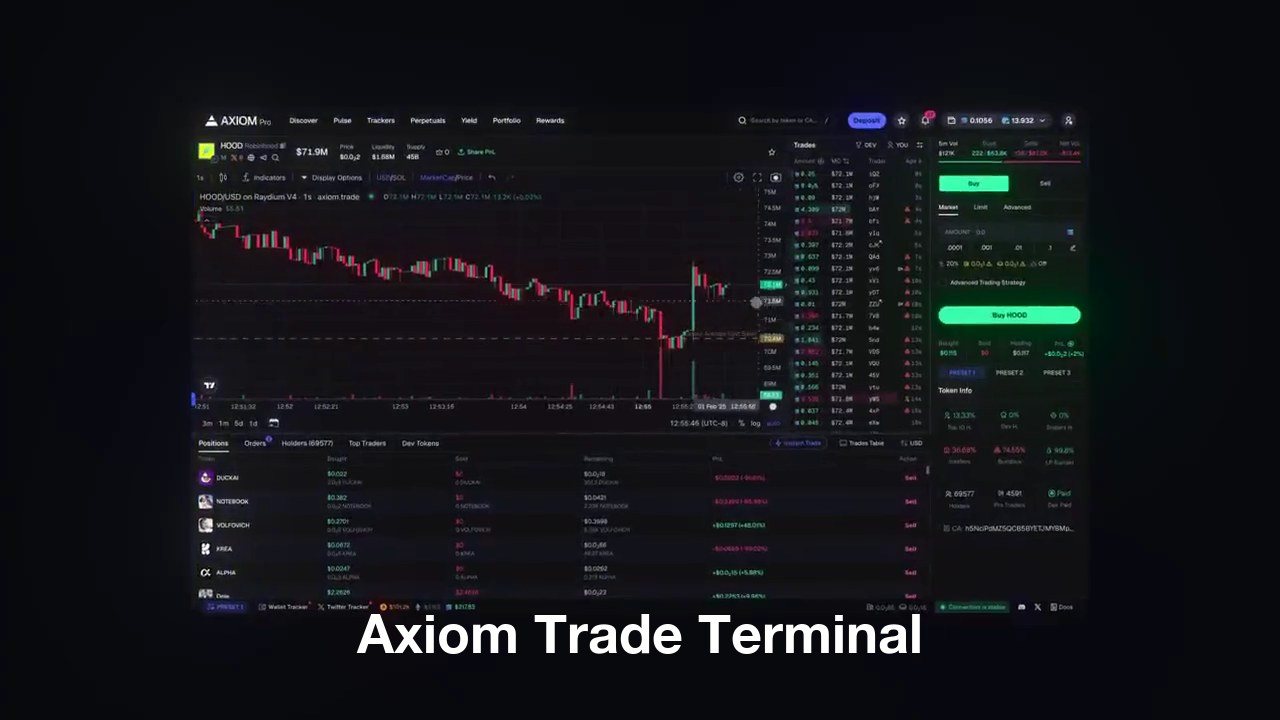
The Axiom Trade terminal is the screen you actually trade from: a chart, an order panel with hotkeys,
a launchpad feed, wallet and social trackers, perps and prediction markets, all in one browser tab and on eight chains. This page walks the layout tab by tab and explains what sits underneath the fills.
Open an account through axiom.trade/@tradenow and code TradeNow cuts its fee from 1% to 0.8%.
The Axiom Trade invite code is TradeNow. Axiom calls it a
referral code. Enter it when you sign up and your trading fee drops by 20% for the life of the account, from 1% to
0.8% a trade.
If you are looking for an Axiom Trade invite code, use TradeNow. Type it into the referral
field on the sign-up screen, or open axiom.trade/@tradenow and it is filled in for you. It is one of the most used
Axiom codes, and it still works.
The Axiom Trade terminal is a web-based trading interface for on-chain tokens. It
combines a live chart, one-click buying and selling, a feed of new token launches, trackers for wallets
and social accounts, and a built-in wallet, so a trade goes from discovery to execution without leaving
the tab. It began on Solana in early 2025, and the same interface now covers seven more chains, from Ethereum and Base to Robinhood Chain and HyperEVM.
It is a terminal, not a bot. Nothing runs unattended unless you set it to:
limit orders, migration snipes and copy trades are rules you write, and everything else is a click or a
key press with the chart in front of you.
Key facts about the Axiom Trade terminal
Where it runs
In the browser at axiom.trade, desktop and phone. No install.
Solana, Ethereum, Base, BNB, Ink, Arc, Robinhood Chain and HyperEVM, from one selector
Order entry
Instant Trade panel beside the chart, three fee presets, hotkeys
Wallet
Created at sign-up, keys exportable, up to 25 wallets per account
Base fee
1% per swap, 0.8% with code TradeNow, minus cashback tiers
MEV protection
Off, Reduced, Secure, plus private submission
Perps and predictions
Hyperliquid perpetuals and Polymarket markets from the same account
Axiom Trade Terminal
The Layout, Tab by Tab
The top bar is the whole map. Seven tabs, a search box, the chain selector, and your wallet
balance. Everything else on the screen belongs to whichever tab is open.
Discover
Two lists, New Pairs and Trending, with a time window you can set and filters for age, liquidity,
holder concentration and whether the token has paid for its DEX listing. Trending ranks by real
activity over the window, which also makes it the first place wash trading shows up.
Pulse
The launchpad feed. Three columns, New Pairs, Final Stretch and Migrated, a protocol filter that
differs per chain, fourteen numeric filters, and a lightning-bolt Quick Buy on every row. On
Solana it reads twelve pads; on Robinhood Chain fifty-five entries. The
memecoin sniper page covers which filters matter.
Trackers
Tracking for up to 10,000 wallets next to Pulse, the built-in Twitter monitor with handles you add, and Vision, which picks KOL and insider wallets out of the flow.
The wallet tracker and Twitter tracker pages go deeper.
Perpetuals
Perps on margin through Hyperliquid, funded from the same account with its own deposit and
withdraw flow, so a spot position and a hedge live one tab apart.
Predictions
Polymarket markets traded inside the terminal. Same wallet, same fee ledger. How the bridge works is on the prediction markets page.
Rewards and Portfolio
Rewards holds the cashback tier, the referral ledger and the leaderboard. Portfolio, rebuilt in
August 2026, is positions, realised PnL, a PnL calendar and shareable PnL cards across every wallet
you hold; see the portfolio tracker page.
The Chart and the Order Panel
Open any token and the screen splits: a TradingView chart with the trades, holders, top
traders and orderbook underneath, and the Instant Trade panel on the right. That panel is where most of
the terminal's speed is, because it removes the confirmation screen.
Buys are sized in SOL or ETH, sells in percent of the position, and both fire on one click. Turn on
hotkeys and they fire on Space plus a key instead. Limit orders are set by dragging a line on the chart.
Migration actions, buy or sell the instant a curve graduates, sit under Advanced. Trader Scan lives in
the orderbook: for any wallet on the token it shows what they bought, sold, hold, and their realised
PnL and holding time.
Three presets, P1 to P3, hold priority fee, tip, slippage and MEV mode as a set, and switch with a
click from the panel or from Pulse. Most people run a quiet one, a normal one and one for launches they
refuse to miss. The numbers that go in them are on the settings page.
What Makes the Fills Fast
Axiom's claim is the fastest submission engine on the market, and the reason it can make
it is that it runs its own nodes and its own landing paths rather than a public RPC. What that means in
practice differs by chain.
Solana
Priority fee and tip decide where you land in a 400-millisecond slot. MEV mode decides who sees
the transaction first: Off, Reduced through Jito, or Secure through whitelisted validators. Husher
and Vanish add private submission. The trade-offs are on the
MEV protection page.
Robinhood Chain, Arc and Base
Robinhood Chain sequences by arrival, so Axiom's Express Lander is a faster route rather than a
bid. Arc works the same way with a USDC tip. Base has Flashblocks, ten preconfirmations per
two-second block, each with its own fee auction. The chain pages cover each in detail:
Robinhood, Arc, Base.
Checks before the fill
Bundle detection flags four or more buys in one block and ignores wallets that do not keep
bundling, holder and dev-share figures sit on every row, and Atlas Maps draw the wallet clusters.
The token scanner page explains how to read them.
The Social Layer
The newer half of the terminal is people rather than tokens. Callouts shows who called a token and what
they hold; Callers ranks them; Streams puts a live stream beside the chart; Communities and Friends
lobbies let a group trade the same screen. Surge and Radar are the algorithmic side, alerting on pairs
that start moving before anyone posts about them. The social trading page
and copy trading page cover how far to trust each.
Wallet, Fees and Yield
Each account gets a Turnkey-secured wallet whose key you can export, and one login can run up to 25 labelled wallets. A Coinbase card option inside the terminal buys up to $500 of crypto a week, no KYC needed. Fees are 1% per swap, 0.8% with the referral code, and every trade pays
cashback in SOL on a tier that climbs with volume, up to 0.25% back; the
fees page has the table. Idle SOL can be staked to Axiom's own validator at zero
commission, or as axiSOL, which is covered on the yield page.
P1 quiet, P2 normal, P3 for contested launches. Set MEV to Secure on anything with real slippage.
Arrange the screen
Pick the chain, set the Pulse protocol filter and the numeric filters, and dock the wallet tracker
beside the feed. Custom themes and font sizes are in settings.
Turn on hotkeys
Enable them in the Instant Trade panel and learn the four you will use. On a launch they are the
difference between this slot and the next.
Terminal or Telegram Bot?
A Telegram bot is faster to open and slower to trade from: every action is a message, and the chart is
somewhere else. The terminal keeps the chart, the feed and the button on one screen, which is why active
traders end up here even if they started on a bot. Axiom also has a
Telegram bot for alerts and quick buys from the phone. For how the terminal
stacks against the other web terminals, see the comparisons with BullX,
Photon and Fomo.
Axiom Trade Terminal — FAQ
Is the Axiom Trade terminal free?
There is no subscription. You pay a 1% fee per swap, 0.8% with code TradeNow, and part of it comes back as cashback depending on your volume tier.
Does the terminal need a wallet extension?
No. Sign-up creates a wallet inside the terminal and the key can be exported at any time. Phantom can be connected instead if you prefer to keep your own.
Which chains does the Axiom Trade terminal support?
Eight: Solana plus seven EVM chains, of which HyperEVM is the newest. One selector at the top switches every tab between them, and presets and tracked wallets carry across.
Can I trade perpetuals and prediction markets in the terminal?
Yes. Perps go to Hyperliquid and event markets to Polymarket, each with a tab in the top bar and both paid from the same Axiom account.
Is there a desktop app?
No, and no mobile app either. The terminal runs in the browser on desktop and phone; on a phone you can pin it to the home screen so it opens full-screen.
How does the terminal protect against sandwich bots?
Through the MEV mode in each preset: Reduced routes through Jito, Secure sends only to whitelisted validators, and Husher or Vanish submit privately. Secure is the setting to use on anything with meaningful slippage.
What is the difference between Axiom Trade and Axiom Pro?
Axiom Trade is the terminal at axiom.trade. Axiom Pro is the guide you are reading, run by an affiliate, and TradeNow is a referral code for that terminal.
Disclaimer
Disclaimer: a terminal makes trading faster, not safer, and most new tokens lose value. Features, fees and chain support can change without notice. Not financial advice. Axiom Pro is a guide written by an affiliate, separate from Axiom Trade.

 Open the Terminal (20% Off)

The Social Layer
The newer half of the terminal is people rather than tokens. Callouts shows who called a token and what they hold; Callers ranks them; Streams puts a live stream beside the chart; Communities and Friends lobbies let a group trade the same screen. Surge and Radar are the algorithmic side, alerting on pairs that start moving before anyone posts about them. The social trading page and copy trading page cover how far to trust each.